Last updated · Written by the Supplement Facts Label Maker editorial team from FDA regulations (21 CFR 101.9, 101.36) and the FDA Dietary Supplement Labeling Guide.
This free supplement facts label maker turns your formula into the black-and-white panel printed on every vitamin, protein powder and herbal supplement sold in the US. Enter the amount per serving and the tool handles the parts that are easy to get wrong: the % Daily Value maths, FDA ordering of vitamins and minerals, the dagger (†) for ingredients without a Daily Value, proprietary blends and the footnotes. It also works as a nutrition facts label maker for foods and drinks.
How to make a Supplement Facts label in 4 steps
- Enter the serving. Type the serving size (for example “2 Capsules” or “1 Scoop (10 g)”) and the servings per container.
- Add dietary ingredients. Pick vitamins and minerals from the list and enter the amount per serving; %DV is calculated from current FDA Daily Values. Add botanicals and other ingredients without a Daily Value, and any proprietary blends with their total weight.
- Add other ingredients and allergens. List the capsule, fillers and flavors under “Other ingredients” and tick any of the 9 major allergens to build the “Contains:” line.
- Check and download. Review the live preview and the checklist, choose the label width, then download a PNG free, or a vector SVG / exact-size PDF with Premium.
What a Supplement Facts label must include
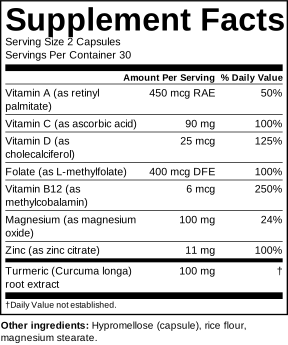
Under 21 CFR 101.36 the panel itself contains, in this order:
- The title “Supplement Facts”, larger than everything else in the panel.
- Serving Size and Servings Per Container, as the consumer measures it (capsules, tablets, scoops).
- “Amount Per Serving” and “% Daily Value” headings.
- Dietary ingredients with a Daily Value: calories and macronutrients if present, then vitamins and minerals in the FDA order, each with amount, unit (mcg RAE, mg, mcg DFE…) and %DV.
- Other dietary ingredients below a bar, with the plant part for botanicals and a dagger instead of a %DV.
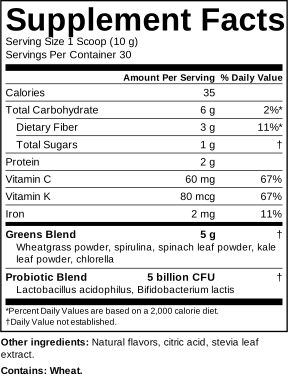
- Proprietary blends with a name, total weight and components in descending order of weight.
- Footnotes: “†Daily Value not established.” and, when macronutrients carry a %DV, “*Percent Daily Values are based on a 2,000 calorie diet.”
Directly under the panel go the “Other ingredients” list (capsule shell, fillers, flavors) and the “Contains:” allergen statement. The full checklist, including the statement of identity, net quantity and the required disclaimer for structure/function claims, is in our guide to dietary supplement label requirements.
Supplement Facts vs Nutrition Facts
| Topic | Supplement Facts | Nutrition Facts |
|---|---|---|
| Used for | Dietary supplements (capsules, gummies, powders) | Conventional foods and drinks |
| Regulation | 21 CFR 101.36 | 21 CFR 101.9 |
| Ingredients without a DV | Allowed, marked with † | Not allowed in the panel |
| Plant part / source | Listed in the panel | Ingredient list only |
| Zero-amount nutrients | Not listed | Core nutrients always listed, even at 0 |
Not sure which applies? Read Supplement Facts vs Nutrition Facts.
Common supplement label mistakes this tool prevents
- Old units. Vitamin A, D and E are no longer declared in IU; folate is in mcg DFE and niacin in mg NE. The tool uses the current units.
- Wrong %DV. The 2016 rule changed many Daily Values (vitamin D to 20 mcg, magnesium to 420 mg, calcium to 1,300 mg). Percentages are calculated from the current table.
- Listing zero amounts. Supplement Facts should not declare nutrients present at zero; blank fields are left off.
- Missing blend weight or components out of order.
- Forgotten footnotes for daggers and asterisks.
Free vs Premium
The free label maker is complete: every field, both label types and a PNG download. Premium is for when you send artwork to a printer or designer: vector SVG, exact-size PDF and 300 dpi PNG without the credit line, plus a library of saved products. It costs $12 per month (cancel anytime) or $79 per year. Compare plans.
Supplement Facts label maker FAQ
Is this Supplement Facts label maker really free?
Yes. You can build unlimited Supplement Facts and Nutrition Facts labels and download a 600-pixel PNG without an account. Premium ($12/month or $79/year) adds print-ready vector SVG, exact-size PDF and 300 dpi PNG with no credit line, plus a saved label library.
Does a dietary supplement need a Supplement Facts label instead of Nutrition Facts?
Yes. Products marketed as dietary supplements use the Supplement Facts panel under 21 CFR 101.36. Conventional foods and beverages use the Nutrition Facts label under 21 CFR 101.9. The supplement panel can list ingredients with no Daily Value, such as botanicals, and shows the plant part used.
How is % Daily Value calculated on a Supplement Facts label?
Divide the amount per serving by the FDA reference Daily Value and multiply by 100. For example 90 mg of vitamin C ÷ 90 mg DV = 100%. On Supplement Facts the percentage is rounded to the nearest whole number, and amounts under 1% are shown as “<1%”.
What does the dagger (†) mean on a supplement label?
The dagger marks a dietary ingredient that has no established Daily Value, such as turmeric extract, creatine or a probiotic. The panel then carries the footnote “†Daily Value not established.” This tool adds both automatically.
How do I list a proprietary blend?
Give the blend a name and its total weight per serving, then list the components in descending order of weight. Individual component amounts are not required inside a proprietary blend, but the total is. Each blend is marked with a dagger because it has no Daily Value.
Is the label FDA approved or FDA compliant?
The FDA does not approve supplement labels before sale, and no software can guarantee compliance. This tool follows the FDA visual format and rounding rules for the numbers you enter. You remain responsible for accurate amounts, ingredient identity, claims and the rest of the package, so have the final label reviewed before printing.
What file formats can I download?
Free: PNG at 600 pixels wide with a small credit line, good for mock-ups and listings. Premium: vector SVG for designers, a PDF at the exact physical width you choose (2 to 4 inches), and a 300 dpi PNG, all without the credit line.
Is my formula private?
Yes. The label is generated entirely in your browser. Your formula is not uploaded to our servers. Drafts are saved only in your own browser’s storage so you can pick up where you left off.
Need a blank panel instead? Download a free blank Supplement Facts label template.