Last updated · Written by the Supplement Facts Label Maker editorial team from FDA regulations (21 CFR 101.9, 101.36) and the FDA Dietary Supplement Labeling Guide.
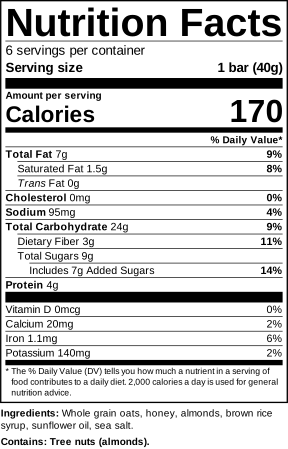
This nutrition facts label maker (also called a nutrition label generator or food label creator) draws the standard vertical label defined in 21 CFR 101.9(d): bold title, servings, calories in large type, % Daily Values and the footnote. Enter numbers per serving and download the label for your packaging, product listing or cottage food stall.
How to make a nutrition label
- Enter the serving size in household and metric units, e.g. “1 bar (40g)”, and the servings per container.
- Type unrounded calories and nutrients from your lab report or nutrient database.
- Add vitamin D, calcium, iron and potassium (enter 0 if absent), plus any other vitamins you want to declare.
- Add the ingredient list and tick allergens, then download.
Nutrition label rules the tool handles
- Current 2016/2020 format: larger calories, “Includes Xg Added Sugars”, vitamin D and potassium instead of vitamins A and C.
- FDA rounding for calories, fats, cholesterol, sodium, carbohydrates and micronutrients.
- %DV from the current Daily Values (e.g. sodium 2,300 mg, fiber 28 g, added sugars 50 g).
- “Contains:” statement for the 9 major allergens, including sesame.
Selling a vitamin, protein powder or herbal product? It needs a Supplement Facts label instead. See Supplement Facts vs Nutrition Facts.
Nutrition label FAQ
Which nutrients are mandatory on a Nutrition Facts label?
Calories, total fat, saturated fat, trans fat, cholesterol, sodium, total carbohydrate, dietary fiber, total sugars, added sugars, protein, vitamin D, calcium, iron and potassium. They are shown even when the amount is zero.
Does the tool apply FDA rounding rules?
Yes. Calories round to the nearest 5 up to 50 and to the nearest 10 above that, fats to 0.5 g below 5 g, sodium to 5 or 10 mg, and so on, following 21 CFR 101.9(c). Enter unrounded values and the label rounds them.
Where do I get the nutrition numbers?
From a lab analysis or a nutrient database calculation of your recipe (for example USDA FoodData Central). This tool formats numbers; it does not calculate them from a recipe.
Can I make a Nutrition Facts label for a cottage food or small business?
Yes. Many small businesses qualify for a nutrition labeling exemption, but if you choose to show a panel or make a nutrient claim, it must follow the FDA format. Check your state rules and the FDA small business exemption.
What is the difference from the Supplement Facts label?
Supplement Facts is for dietary supplements and allows ingredients without a Daily Value. Nutrition Facts is for foods. Use the tab at the top of the tool to switch between them.
Is it free?
Yes, including PNG download. Premium adds vector SVG, exact-size PDF and 300 dpi PNG with no credit line.